Register

A Virtual Private Cloud built around your network


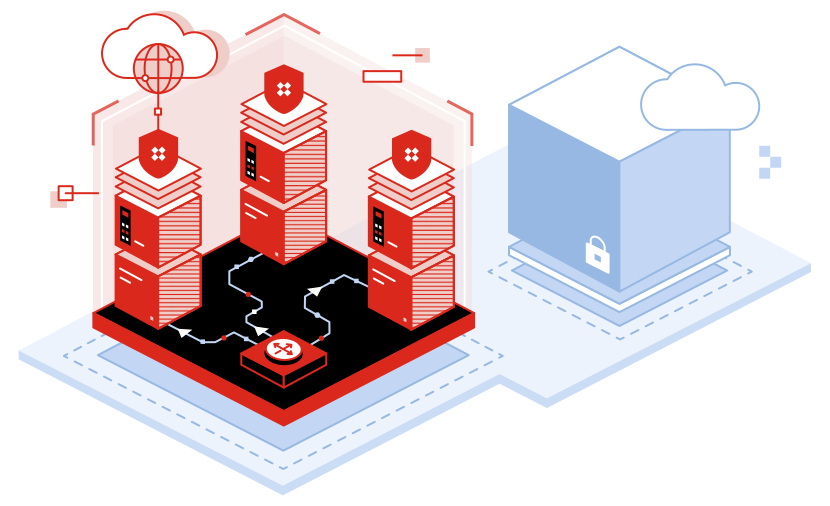
A Virtual Private Cloud (VPC) is an isolated network that belongs to your organization. Split it into subnets with the private address ranges you choose, attach instances while they run, and let the platform route traffic between subnets.

Use separate subnets for application tiers, environments or teams while keeping communication under your control. Security Groups filter traffic on every attached instance, including private connections inside the VPC. Each VPC runs on its own network overlay, so its traffic remains separate from every other VPC, including other VPCs in your organization.

VPC is available in every Exoscale zone and is fully managed through the API and CLI.
Why choose Exoscale Virtual Private Cloud

Control your private network picto

Control your private network

Choose your private address ranges, divide workloads into subnets and define how traffic is routed between them.

Secure every private connection picto

Secure every private connection

Apply Security Groups to traffic inside and across subnets, using the same filtering model that protects public interfaces.

Free and ready in every zone picto

Free and ready in every zone

VPCs, subnets, routes and private traffic are free. VPC is available in every Exoscale zone and backed by a 99.95% monthly availability SLA.

SCION Connectivity

Secure SCION Connectivity

Connect cloud, on-premises, and partner environments through the SCION Network using Anapaya EDGE, with controlled network paths and resilient multipath connectivity.

Build secure network foundations for your workloads

Use Virtual Private Cloud to separate application tiers, standardize environments and route traffic through the services your architecture requires.

Multi-tier applications


Separate web, application and database workloads into dedicated subnets instead of placing every instance on one flat network. The platform creates the routes between subnets, while Security Groups define exactly which services and ports each tier can reach.

Keep databases and internal services on private addresses, expose only the entry points that need public connectivity, and change the layout as your application grows. Instances can join or leave a subnet while running, without a reboot.

A landing zone foundation


Give development, staging and production environments clear network boundaries with a dedicated VPC and subnets for each application tier. Keep addressing, routes and Security Group rules in code so the same foundation can be reviewed and reproduced across teams.

Combine the network design with Exoscale organizations and IAM roles to create a consistent landing zone for every team. Read more in Building a Landing Zone on Exoscale.

Your own network appliances


Add custom subnet routes to send traffic through a firewall, VPN endpoint or another network appliance running on a Compute instance. Each subnet carries its own routes, so you decide which workloads go through which appliance.

Use this pattern to give private instances controlled internet access, to inspect traffic, or to connect the VPC to another environment. The VPC documentation includes step-by-step recipes for a NAT gateway and a WireGuard VPN gateway.

Anapaya EDGE is one such appliance: it provides a secure gateway for connecting existing services and networks to the SCION Network.

VPC features

Build your VPC with Exoscale services

Run workloads inside your VPC, control private traffic between them and provide stable public access only where you need it.

Compute Instances

Compute Instances

Attach Compute Instances to one or more subnets in the same VPC. Add or remove private network interfaces while your instances continue running.

Discover
Security Groups

Security Groups

Apply the Security Groups attached to your instances to private VPC traffic. Allow communication by protocol, port, subnet range or Security Group.

Discover
Elastic IP

Elastic IP

Add a persistent public IPv4 or IPv6 address to selected Compute Instances while keeping application and data tiers on private VPC addresses.

Discover

Virtual Private Cloud trusted by engineers across Europe

When running mission critical production workloads in the cloud, a partner you can rely on makes all the difference. Our customer success engineers have helped hundreds of customers from all over Europe migrate, run and scale production workloads on Exoscale.

Contact us

Explore helpful resources for Virtual Private Cloud

Create, configure and route your private networks with Exoscale’s practical guides.

Quick start your VPC

Create a VPC, add a subnet and connect two instances in minutes with this step-by-step guide.

VPC overview

Understand how VPCs, subnets, routes and Security Groups work together before you design your network.

How-To guides for VPC

Practical guides for routing rules, cross-subnet communication and inspecting subnet attachments.

Frequently asked questions about Virtual Private Cloud

What is Exoscale Virtual Private Cloud (VPC)?

Exoscale Virtual Private Cloud is a virtual private cloud service that provides a private, isolated network inside one Exoscale zone. You split it into subnets, each with its own private IPv4 range, and attach Compute instances to them. Traffic in a VPC stays inside that VPC and is never visible to other VPCs.

What is the difference between a Dedicated Hypervisor and a Virtual Private Cloud?

A Dedicated Hypervisor provides hardware isolation by running your Compute instances on a physical hypervisor reserved for your organization. A Virtual Private Cloud provides network isolation by placing instances in private, routed subnets and applying Security Groups to their traffic. They address different layers and can be used together when a workload needs both dedicated compute hardware and an isolated private network.

I use Private Networks today. What should I do?

Your Private Networks keep working until their end of life, 180 days after the notice emailed to the owners of the organizations that use them. Private Networks linked to Private Connect are not affected. You can move to VPC without downtime. Attach your instances to a VPC subnet next to their Private Network, add Security Group rules for your private traffic, then move your services over one by one. The migration guide in the VPC documentation takes you through each step.

How is VPC different from Private Networks?

A VPC is a routed network that lets you organize workloads across multiple subnets, filter private traffic with Security Groups and add your own routes. On a Private Network, every instance can reach every other instance without filtering.

What availability does VPC guarantee?

VPC is backed by a 99.95% monthly availability SLA for the network that carries traffic between your attached instances. If availability falls below that target, you are eligible for service credits under the Exoscale Terms and Conditions.

How do Security Groups work inside a VPC?

The Security Groups attached to an instance filter its VPC traffic as well as its public traffic. Private traffic needs a rule that allows it. Rules can reference other Security Groups or the IP range of a subnet.

Can I connect two VPCs?

VPC peering is coming soon. It will connect two VPCs in the same zone and organization over a private path. Until then, each VPC is isolated from every other VPC.

How much does VPC cost?

VPC is free. VPCs, subnets, routes and private traffic between your instances cost nothing. Traffic to the internet follows our standard network pricing.