What is Object Storage?
 Denis Arnst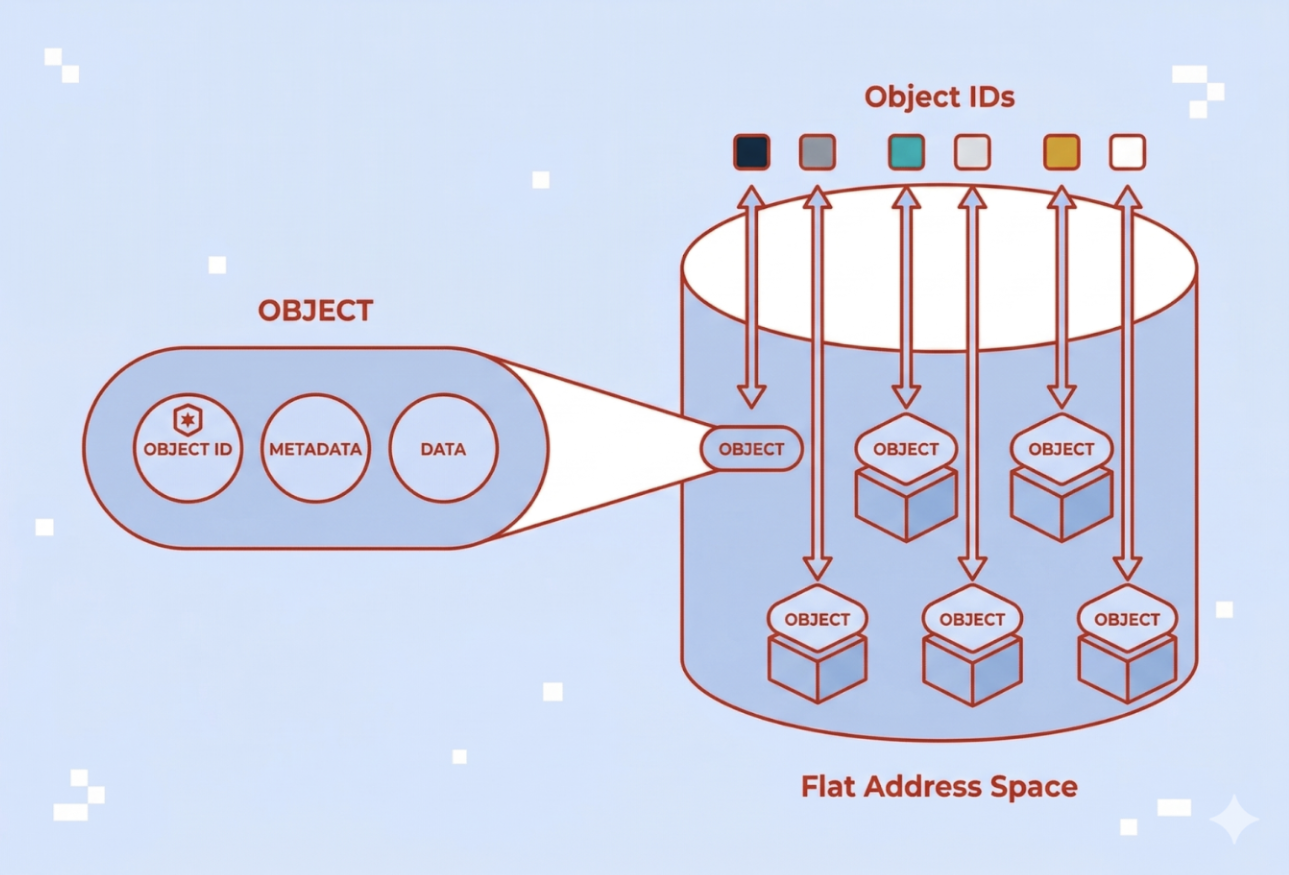
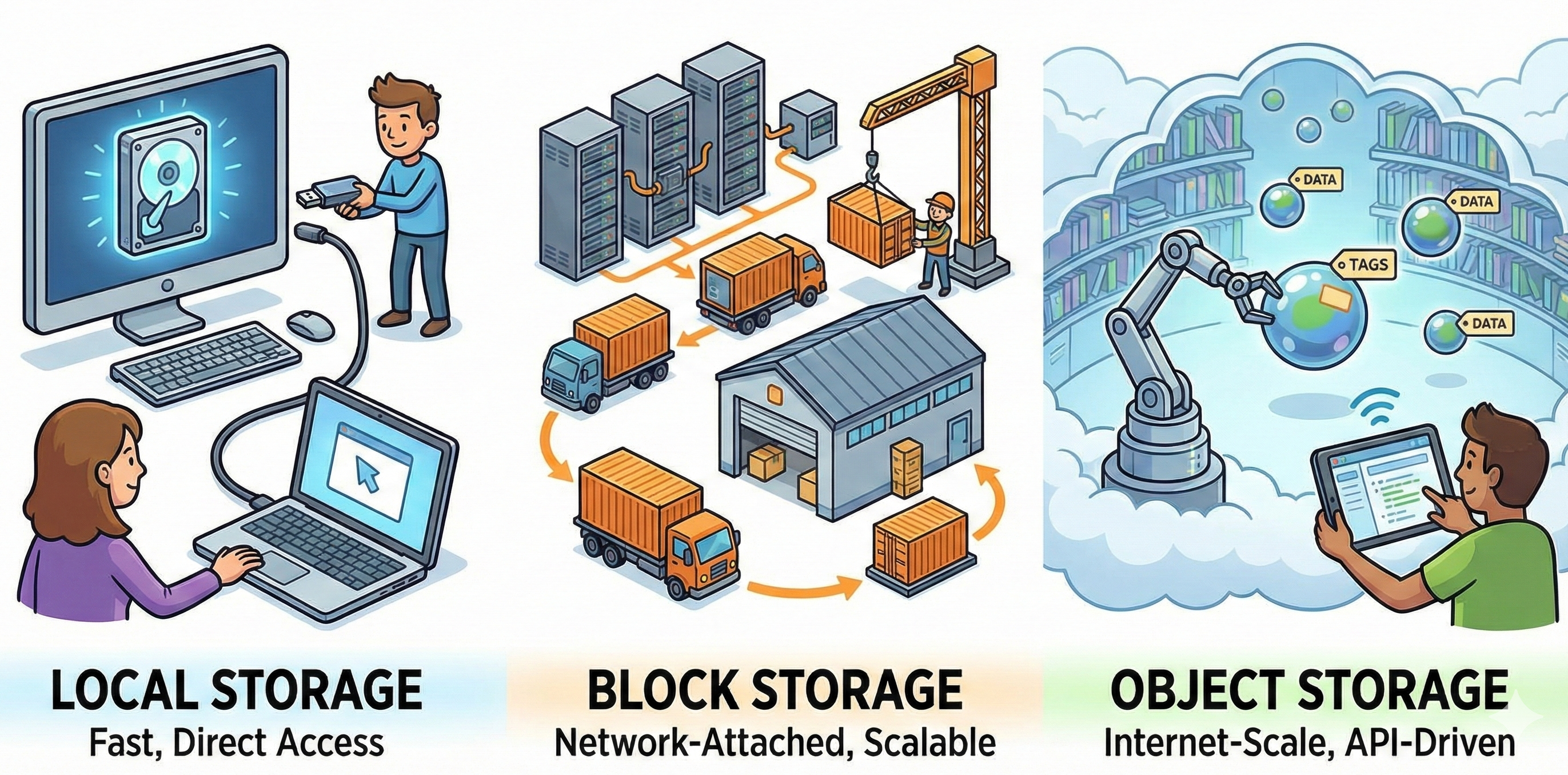
Today’s enterprises are generating data at a large scale: Video streams, machine learning datasets, application logs, and backup archives create petabytes of unstructured information that traditional storage systems struggle to accommodate efficiently. Object storage has become the architecture of choice for managing this explosive growth. Unlike conventional file or block storage, it treats each piece of data as a discrete object, enabling organizations to scale storage capacity with predictable performance.
Object Storage: Definition and Key Concepts
Object storage is an architecture that manages data as distinct units called objects. Each object combines three elements: the data itself, metadata describing that data, and a unique identifier used to retrieve it. Object storage is also commonly referred to as object-based storage.
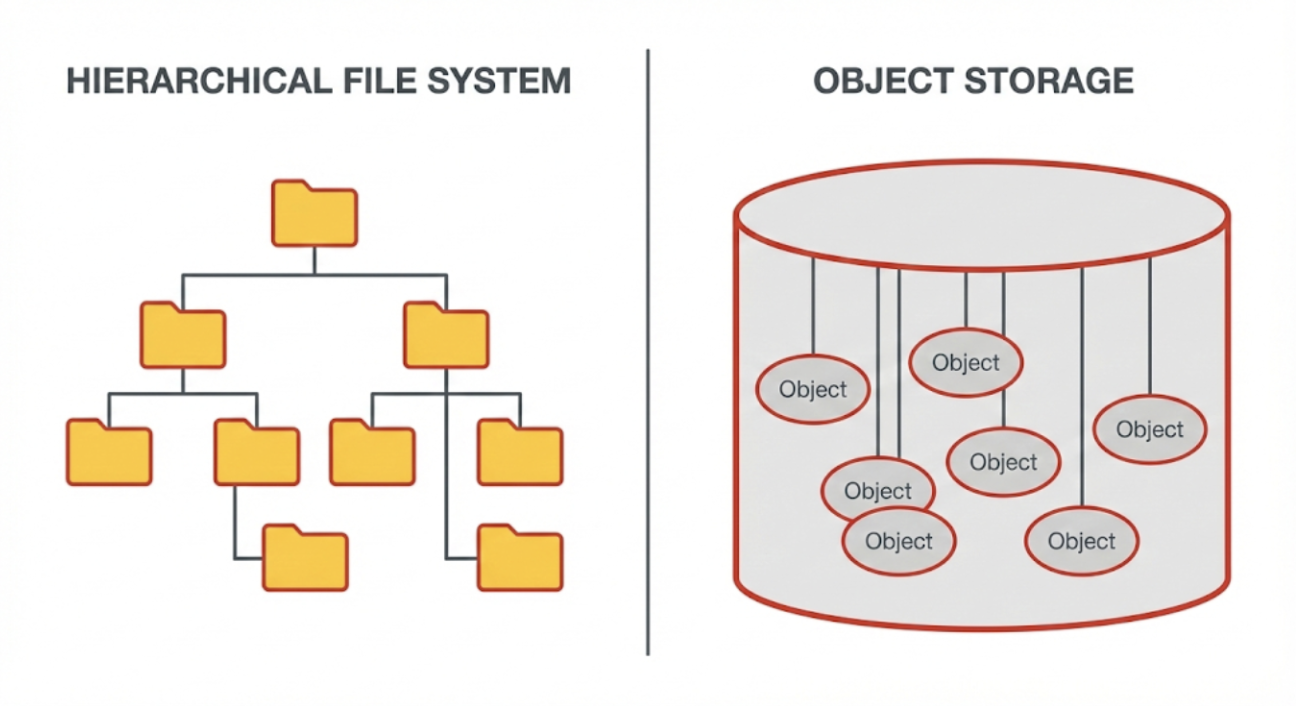
Unlike file systems that organize information in hierarchical folder structures, object storage uses a flat address space. While tools may display data in folders for human readability, these are actually just part of the object’s name (prefixes) rather than physical directories. That means, objects are stored and accessed via their identifiers rather than file paths, reducing reliance on deep directory trees and simplifying large-scale organization.
A common concept in modern object storage systems is S3 compatibility. In practice, S3-compatible typically means a storage system supports an S3-style API that many tools and applications can integrate with. The level of compatibility can vary by provider and feature set, so teams should validate required API operations during evaluation.
How Object Storage Works
Object-based storage operates through a fundamentally different mechanism than traditional file or block storage systems. One of the biggest differences is using unique identifiers rather than directory structures.
The access model typically follows this sequence:
- Write operation: When an application needs to store data, it sends the object along with metadata to the storage system via a RESTful API.
- Storage: The system assigns a unique identifier to that object and stores it in a flat address space.
- Retrieval: To retrieve data, the application references the unique identifier through HTTP or HTTPS requests.
- Return: The system locates the object and returns it (often with associated metadata).
Metadata also serves as the foundation for automated data management policies. The storage system maintains a metadata index that tracks each object’s identifier, size, creation date, access controls, and any custom attributes defined by users. Applications are able to query objects based on their id or path and receive metadata attributes without accessing the data itself. For example, metadata or tags can trigger lifecycle policies such as:
- Retention: Keep objects for a defined period
- Tiering: Move objects based on policy criteria
- Automated deletion: Remove objects when rules are met
With the access model in mind, the next step is to understand how object storage systems are built to scale out and stay resilient when they manage massive datasets across distributed infrastructure.
Object-based Storage: The Architecture Behind Scalability and Resilience
Object storage systems are typically built on distributed, scalable principles. This approach is designed to scale with rising data volumes while keeping operations manageable. These principles include:
Scale-Out Design: What happens in the background
Object storage grows by adding nodes to a shared pool; each node contributes capacity and resources. Control and data services are distributed, reducing reliance on any single controller. Deployments can span multiple devices and, depending on design, multiple zones/sites. This model helps avoid classic bottlenecks from scale-up architectures and simplifies capacity planning.
Managing Scale: How a growing system stays efficient
A flat namespace removes directory-tree overhead: objects are addressed by IDs instead of paths. Metadata tracks where objects live and coordinates placement and retrieval, which supports very large object counts. This organization improves manageability at scale, while actual performance still depends on workload, placement policy, and network design.
Durability and Data Protection: How failures are handled
Platforms use replication (multiple full copies) and/or erasure coding (data + parity fragments) to survive failures and self-heal automatically. Placement policies spread replicas across failure domains to tolerate localized incidents. Cross-zone replication can support disaster-recovery objectives and geographic separation. These mechanisms raise durability, but they do not eliminate backup needs—retention and recovery objectives still drive a separate backup strategy.
Benefits of Object Storage: Scalability, Metadata, and Cost
Object storage delivers advantages that align well with enterprise requirements for managing unstructured data at scale. Understanding these benefits helps organizations evaluate whether object-based storage fits their specific infrastructure needs.
- Universal accessibility over standard web protocols: Objects are accessible via widely used HTTP/HTTPS endpoints and API clients. This reduces the need for specialized client software and simplifies cross-network access and sharing.
- Cost efficiency at scale: At high data volumes, an object storage system is often positioned as a cost-effective model, particularly when lifecycle policies curb growth and place data on appropriate tiers.
- Flexibility across data types: The model accommodates unstructured, semi-structured, and (exported) structured artifacts. Workflows can organize data according to business context using keys and metadata.
- Built-in security primitives: Typical platforms support encryption in transit and at rest, along with access controls at bucket/object scope.
- Cloud and ecosystem integration: S3-style APIs and tooling make it straightforward to plug object storage into cloud-native applications and hybrid pipelines.
- Operational visibility and governance: Tagging, metrics, and logs enable monitoring of growth, access patterns, and lifecycle outcomes. Regular reviews keep usage aligned with budgets and retention requirements.
Trade-offs to Consider Before Choosing Object Storage
While object-based storage offers compelling advantages, understanding its disadvantages or limitations helps organizations determine where it fits best within their storage architecture.
Not Ideal for Frequently Changing Data
Object storage works best for static storage, especially for unstructured data, where the data is once written but may need to be read many times. It’s not a good solution for dynamic data that is constantly changing, as organizations need to rewrite the entire object to modify it.
Application Integration May Require Adaptation
Object storage relies on RESTful API access rather than traditional file system protocols. Applications designed around file or block storage paradigms may need modification to work with object storage systems. Organizations should evaluate whether their application stack can adopt API-based storage access or whether file system compatibility remains essential.
Governance Required to Prevent Sprawl and Cost Issues
The ease of scaling object-based storage can become a liability without proper data governance. Organizations should define clear policies for data classification, retention schedules, archival, and compliance. These policies control storage costs and ensure that aging or obsolete data does not clutter the environment.
Object Storage as a Service: Governance, Cost, and Control
Object Storage as a Service (OSaaS) is a managed model in which the provider operates the platform and capacity, while access occurs through APIs under usage-based pricing. Operational effort is lower than in self-managed clusters, and spending tends to shift from upfront purchases to ongoing consumption.
The model characteristics of Object Storage as a Service:
- API access, not infrastructure: Organizations interact via REST/HTTP(S), while the provider handles hardware, scaling, and updates.
- Shared responsibility: The provider runs the service, customers define identity and access, metadata and lifecycle rules, and encryption posture.
- Elastic consumption: Costs typically reflect stored capacity and, depending on the provider, request, and data-transfer components.
Common adoption includes cloud-native workloads that persist unstructured application data (uploads, media assets, build artifacts, logs, generated outputs) alongside databases for transactional state. Hybrid strategies pair on-premises systems with cloud object tiers for colder data, long-term retention, or as a replication target to meet recovery objectives. Multi-year retention mandates are another driver, where audit logs and records benefit from metadata and lifecycle policies to document retention and enable discovery.
Because a provider manages the platform, control shifts toward policy and oversight on the customer side. Governance is the primary lever for outcomes on cost, security, and compliance:
- Lifecycle policies: Define retention, tiering, and deletion by data class, and document legal-hold exceptions.
- Access controls: Enforce least privilege, review permissions regularly, and enable encryption in transit and at rest.
- Cost visibility: Tag by owner/project, monitor growth and request/egress patterns, and review usage on a fixed cadence to avoid uncontrolled spend.
One example of how enterprises implement these governance principles can be seen in object storage platforms designed for European data sovereignty requirements.
Exoscale Object Storage: A Managed Service in Practice
Exoscale’s Simple Object Storage is a managed, S3-compatible service: the provider operates the platform, while teams access buckets and objects via an S3-style API and standard tooling.
Key capabilities at a glance:
- Data residency and regional control: Data is stored in the country of the selected zone, with additional European zones available for regional alignment and architectural choices
- Resilience by design: Objects are replicated across multiple high-availability nodes within a zone, and optional cross-zone bucket replication supports DR and geographic redundancy
- Governance and security basics: Capabilities include access controls, encryption, versioning, and object lock, alongside lifecycle policies for retention, tiering, and deletion
- Usage-based pricing: Charges reflect stored capacity and, depending on plan, access patterns, and data transfer; tagging and periodic reviews support cost visibility
Because the platform is managed, teams spend less time on hardware, patching, and capacity planning, and more time on access policies, metadata/lifecycle design, and application integration. This shortens time-to-value while keeping ownership clear: the provider operates the service; you control governance, IAM, and cost visibility.
Object Storage Use Cases: Practical Examples
Object-based storage is commonly adopted when datasets are large, predominantly unstructured, and accessed through APIs. The following examples for object storage outline typical patterns where the model aligns with operational and architectural requirements:
- Backup and archiving: Object storage systems serve as a long-retention repository in which durability and lifecycle policies regulate growth. The pattern suits large, mostly static datasets that must remain retrievable for extended periods.
- Media content storage: Images, audio, and video are stored as objects with metadata for ownership, variants, and rights. The delivery occurs via APIs and edge caching.
- Data lakes and analytics: Raw and refined data land in object storage to decouple compute from storage; metadata and external query engines support analytics and ML preparation. The approach scales economically as volumes and formats expand.
- Logs and machine data: Application and platform logs accumulate cost-efficiently for later investigations or analytics, with lifecycle rules maintaining predictable retention windows.
- Archive of IoT data: Historical sensor telemetry is stored for long-term retention. The model supports large archives over extended periods and can accommodate fluctuating ingestion volumes. Device telemetry and time-series payloads are persisted as immutable objects; retention and downstream analytics pipelines are commonly applied. The model absorbs bursty ingestion and long historical tails.
- Cloud-native application assets and user uploads: User-generated content (images, documents, recordings) and build artifacts are addressed by keys and accessed via APIs, allowing compute to scale independently.
- Static website assets and distribution: Static assets (images, JS/CSS, downloads) are hosted in object-based storage and fronted with an HTTP endpoint and optional CDN, reducing origin load and simplifying deployment flows.
- Hybrid tiering: Frequently accessed data remains on premises while colder datasets transition to object storage under lifecycle rules, balancing performance and cost.
These examples provide directional guidance only. For each point workload, alignment with retention mandates, durability objectives, access patterns, latency expectations, and governance requirements should be validated before implementation.
Object Storage Care: Operational Best Practices
Effective operations determine whether object-based storage remains searchable, governed, and cost-controlled over time. The focus is on a small set of repeatable practices: plan metadata, enforce access, automate lifecycle, and observe usage trends, then iterate on a fixed cadence.
| Best Practice | Explanation |
|---|---|
| Define a metadata strategy | Standardize object keys and a small, controlled tag set. Record clear ownership/steward roles and document the scheme. |
| Apply access management principles | Enforce least-privilege IAM with separate rights for read, write, delete, and policy changes. Use short-lived credentials, rotate regularly, and enable encryption in transit and at rest. |
| Establish lifecycle policies | Set retention by data class (with legal-hold exceptions), automate tiering based on age/policy, and schedule defensible deletion at end-of-life. |
| Monitor usage, growth, and cost drivers | Track object counts, capacity, requests, and egress/replication hotspots. Tag by owner/project for chargeback, review trends regularly, and alert on anomalies. |
| Use metadata for governance, discovery, and automation | Where supported, index/query metadata to locate data and target policies at scale. Drive classification, retention, and tiering from metadata—not ad-hoc scripts. |
| Document operational runbooks | Maintain procedures for bucket creation, policy updates, DR checks, incident response, and recovery tests, plus change history and approvals for audits. |
What are common pitfalls organizations should be aware of? Missing or inconsistent lifecycle rules lead to unchecked growth and higher spend. Weak metadata strategies reduce findability and create policy gaps. Unclear ownership delays decisions and undermines audits. Broad, long-lived credentials increase access and compliance risk. And without monitoring of request and egress patterns, costs spike and bottlenecks go unnoticed.
Checklist: Select an Object Storage Solution
Choosing an object storage system is primarily a fit exercise: match the platform’s access model and controls to workload patterns, governance needs, and cost behavior. Use the checklist below to structure an apples-to-apples evaluation:
- Workload fit: Data change patterns, access patterns, latency sensitivity
- Identify read/write sizes, update frequency, and concurrency; note whether data is mostly append/immutable vs. frequently modified
- Capture latency/throughput needs (interactive vs. batch) and expected object counts to avoid architectural mismatches
- Integration requirements: API compatibility, tooling, ecosystem support
- Validate S3-style API coverage and required operations; confirm SDKs/CLIs and existing backup/analytics tools work as-is
- Check migration paths (import/export, multi-part uploads, parallelism) and any limits that affect pipelines
- Governance & security: Access controls, auditability, retention, compliance
- Require least-privilege IAM, encryption options (in transit/at rest), versioning/Object Lock where needed
- Ensure policy controls for retention and deletion are auditable and align with regulatory obligations
- Durability & availability expectations: Resilience approach, multi-site options
- Compare replication vs. erasure coding options and what failures they tolerate
- Confirm availability targets and whether cross-zone/region replication is supported and how it’s managed
- Total cost drivers: Capacity growth, requests/access patterns, lifecycle/tiering impact
- Model storage, request, and transfer components against real access patterns
- Use lifecycle policies to cap growth; require cost attribution via tags/metrics
- Data residency & sovereignty
- Verify where data and replicas are stored (country/zone/region) and how residency is enforced
- Confirm contractual/SLA language for location guarantees and options for geo-separation
Shortlist platforms that clear the workload and governance bars first, then pressure-test durability and cost with a pilot using real traffic. Revisit lifecycle, tagging, and IAM settings after the pilot to lock in the operating model before scaling.
What to keep in mind about Object Storage
Object storage manages data as objects addressed by unique identifiers in a flat space, accessed through APIs rather than file paths. This access model, paired with distributed design, explains why it is widely used for large, unstructured datasets and workflows that benefit from metadata-driven organization and policy automation.
Object-based storage is strongest for high-volume, mostly immutable data and long-retention patterns. Effective outcomes also hinge on governance: clear ownership, consistent metadata, lifecycle rules, and access controls.
FAQ about Object Storage
Is object storage the same as a file system or a shared drive?
No. Object storage addresses data by unique identifiers via APIs in a flat namespace, whereas file systems expose hierarchical paths and directories. The models serve different access patterns and operational needs.
What is the unique identifier in object storage?
It is the key used to store and locate an object without a file path. Depending on the platform, this identifier may be provided by the client or generated by the system.
What kind of metadata should companies plan for upfront?
A minimal, controlled set: ownership/steward fields, sensitivity/classification, retention class, and business tags (e.g., department, project). Consistency matters more than volume.
How do retention, tiering, and deletion policies work in object storage?
Policies evaluate object metadata/tags and execute lifecycle actions such as keeping data for a defined period, transitioning it to a different class, or deleting it at end-of-life. Implementation details vary by provider but follow the same metadata-driven principle.
What does object storage as a service change for governance and control?
The infrastructure is operated by the provider, while governance remains with the customer: IAM, encryption posture, lifecycle/retention, and cost visibility still require configuration and review. This shifts effort from hardware operations to policy and oversight.
How do companies prevent object storage from turning into a data dump?
By enforcing metadata standards, lifecycle rules, and ownership, and by monitoring usage/cost patterns. Periodic governance reviews keep growth aligned with policy and budget.
What are the most common business use cases for object storage?
Typical patterns include backup and archiving, media asset storage, data lakes/analytics landing, logs and machine data, and IoT telemetry at scale. Each emphasizes large, mostly unstructured data with API-based access.