LangChain vs. LangGraph: What They Are, When to Use Which
This post covers what LangChain and LangGraph actually are, when to pick one over the other, and one thing European teams often miss: the framework you choose and where the model runs are two separate decisions.
Quick summary of this article
- LangChain composes model calls and components into pipelines. Use it for RAG, summarization, classification, and any workflow with a fixed sequence of calls.
- LangGraph orchestrates stateful, long-running workflows as an explicit graph. Use it for agents, branching logic, retries, checkpointing, and human-in-the-loop steps.
- They're built by the same company, they interoperate, and in our own work we usually end up using both.
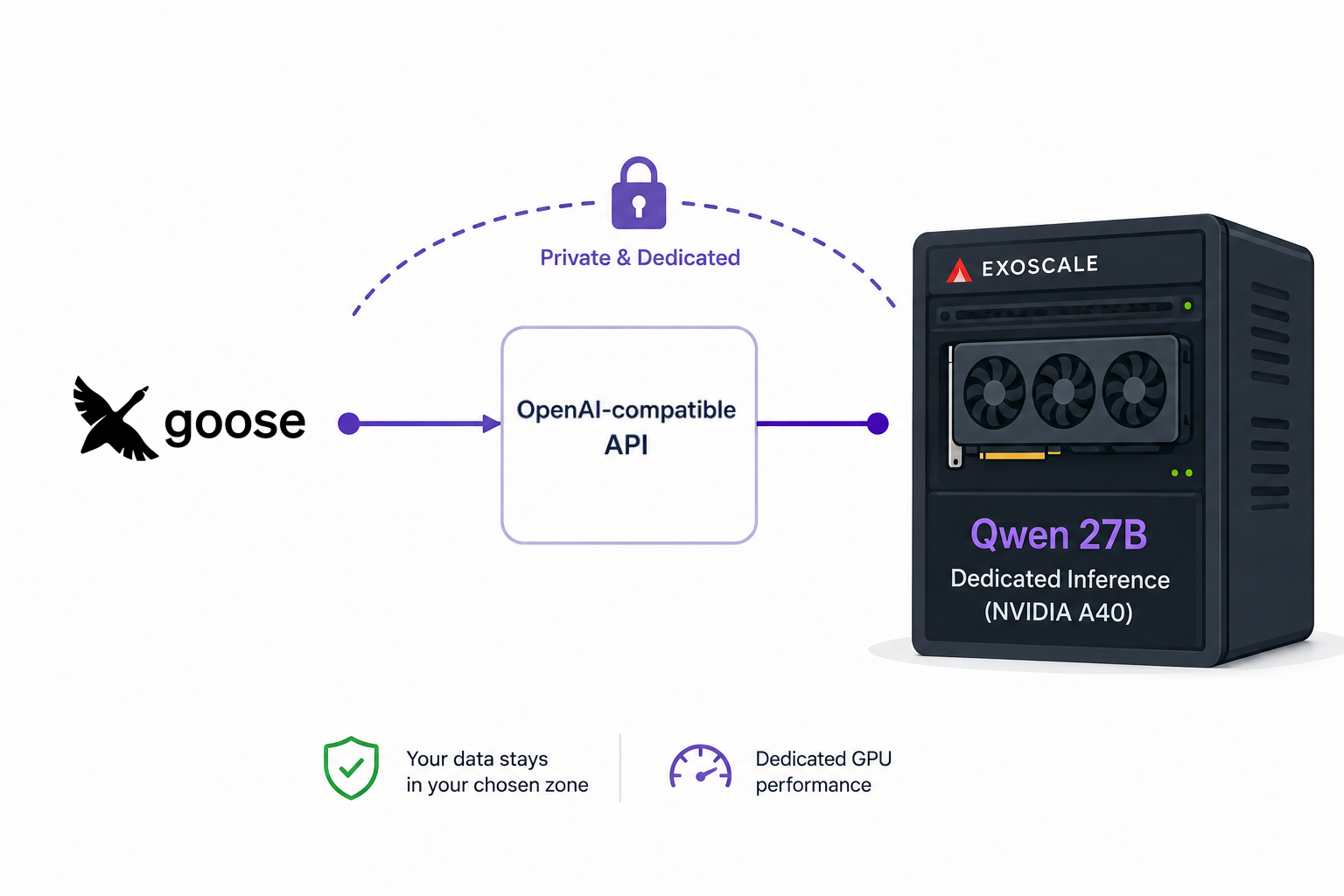
- Neither framework decides where your data goes, the model endpoint does. If you're building an AI chatbot or a RAG app and need to keep customer data in the EU, point `base_url` at an EU-hosted, OpenAI-compatible endpoint. Exoscale's Concrete AI is one such option, hosted on dedicated NVIDIA GPUs in EU and Swiss zones, run by a Swiss-headquartered European sovereign cloud provider.
The two names get conflated because LangGraph is built by LangChain Inc., the packages share ideas, and many tutorials show them side by side. But they solve different problems.
What is LangChain?
LangChain is an open-source framework for building applications on top of LLMs. IBM describes it as “an open-source orchestration framework for application development using large language models,” available in Python and JavaScript.
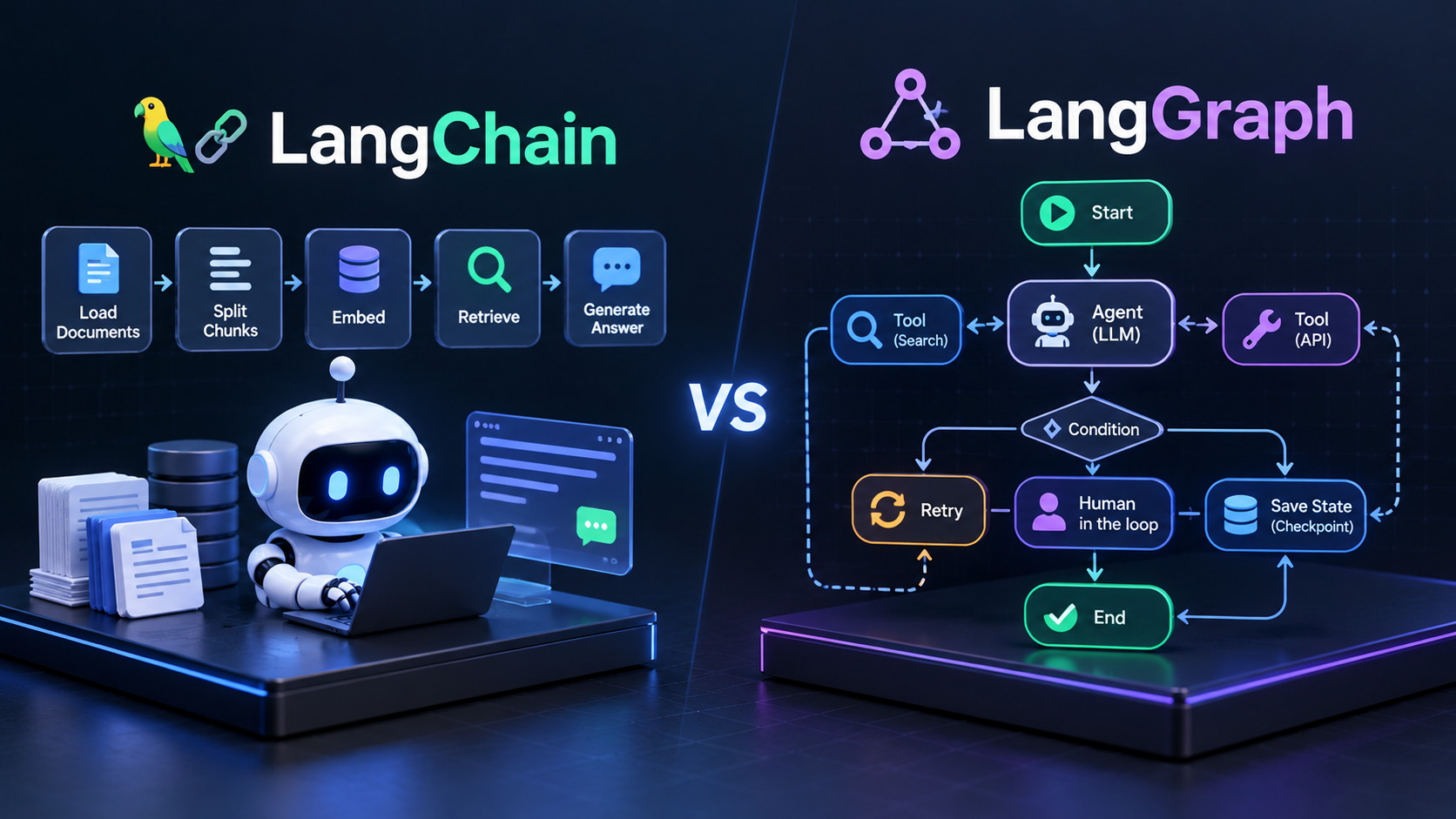
The mental model is a chain, or a pipeline. You take a prompt, send it to a model, parse the result, maybe hand it to a retriever or a tool, and return an answer. Each step is a component, and the components snap together. It’s the natural fit for RAG, summarization, classification, document processing, and any workflow where the sequence of calls is known in advance.
LangChain also gives you integrations. Model providers, vector stores, retrievers, parsers, chat memory backends, most of what you’d want to plug in is already wrapped. For a team writing its first serious LLM application, this is a reasonable place to start. You compose a chain, run it, and iterate.
from langchain_openai import ChatOpenAI

llm = ChatOpenAI(
    model="YOUR_MODEL",
    base_url="https://your-endpoint.example.com/v1",
    api_key="YOUR_API_KEY",
)

response = llm.invoke("Explain Kubernetes in one sentence.")

print(response.content)
What is LangGraph?
LangGraph is a framework for stateful, long-running agent workflows. Where LangChain gives you a chain, LangGraph gives you a graph, also described as a state machine.
The Graph API is built on three primitives:
- State: a shared data structure that carries the workflow’s snapshot
- Nodes: functions that receive the state and return an updated version
- Edges: functions that decide which node runs next, including conditional branches
Compose these, and you get workflows that loop, branch, retry, pause for human input, and persist their state between steps.
LangGraph is a lower-level execution engine, inspired by Pregel-style message passing. It integrates cleanly with LangChain, you can call LangChain components inside a LangGraph node, but it doesn’t require it.
Here’s a minimal example: a graph that calls a model, conditionally routes to a weather tool if the model requests one, and loops back until the model returns a final answer:
import os
from typing import Annotated, TypedDict
from langchain_openai import ChatOpenAI
from langchain_core.messages import ToolMessage
from langchain_core.tools import tool
from langgraph.graph import StateGraph, START, END
from langgraph.graph.message import add_messages

@tool
def get_weather(city: str) -> str:
    """Get the current weather in a city."""
    return f"It's 21C and sunny in {city}."

tools = {"get_weather": get_weather}

llm = ChatOpenAI(
    model=os.environ["LLM_MODEL"],
    api_key=os.environ["LLM_API_KEY"],
    base_url=os.environ["LLM_BASE_URL"],
).bind_tools(list(tools.values()))

class State(TypedDict):
    messages: Annotated[list, add_messages]

def call_model(state: State) -> dict:
    return {"messages": [llm.invoke(state["messages"])]}

def run_tools(state: State) -> dict:
    call = state["messages"][-1].tool_calls[0]
    result = tools[call["name"]].invoke(call["args"])
    return {"messages": [ToolMessage(result, tool_call_id=call["id"])]}

def needs_tool(state: State) -> str:
    return "run_tools" if state["messages"][-1].tool_calls else END

builder = StateGraph(State)
builder.add_node("call_model", call_model)
builder.add_node("run_tools", run_tools)
builder.add_edge(START, "call_model")
builder.add_conditional_edges("call_model", needs_tool)
builder.add_edge("run_tools", "call_model")
app = builder.compile()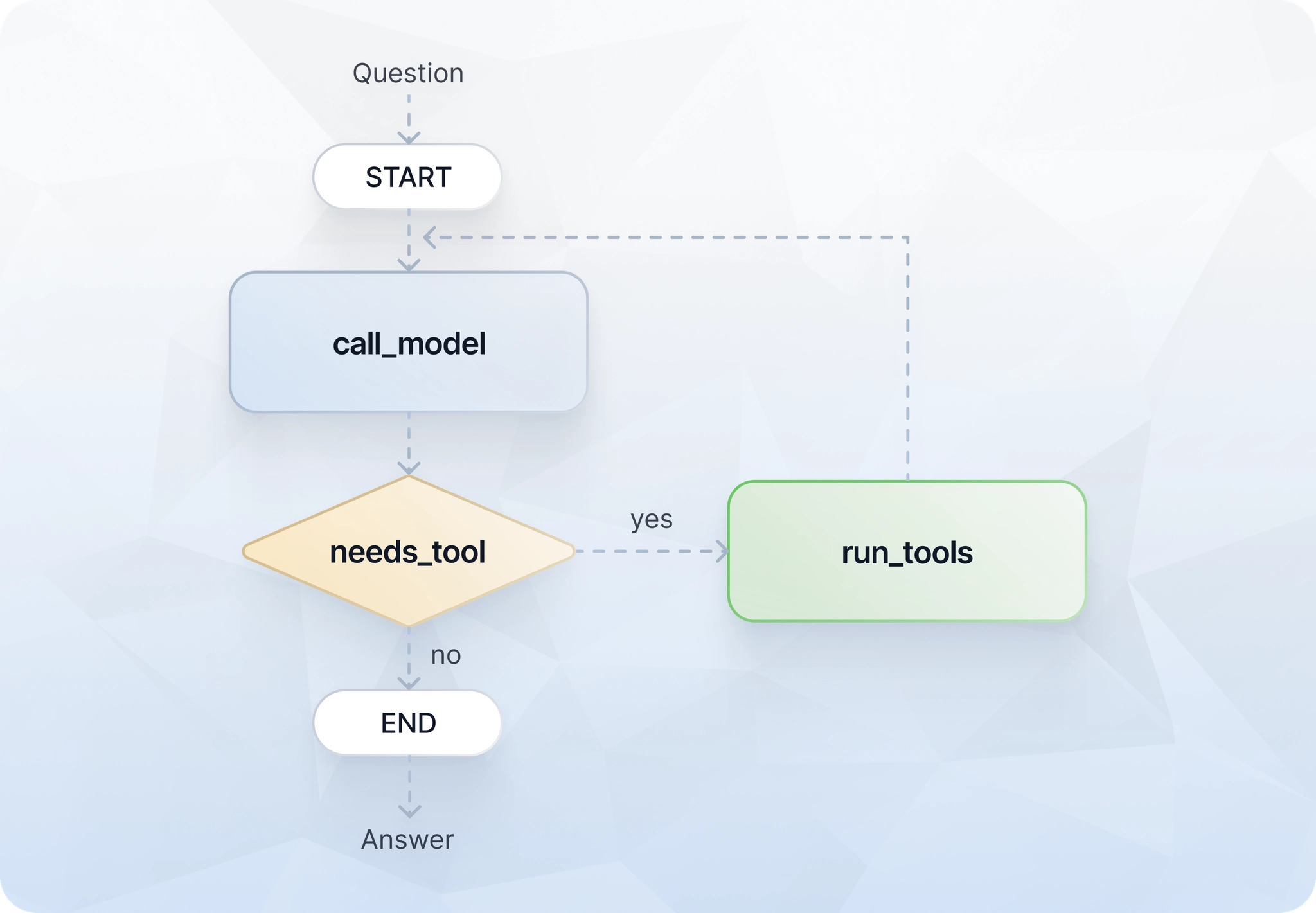
How do LangChain and LangGraph fit together?
Think of it as two layers of the same stack. LangChain is the higher-level component library: models, prompts, retrievers, tools, parsers. LangGraph is the orchestration layer underneath, for when you need control over how those components connect over time.
Since the joint 1.0 release on October 22, 2025, the boundary is explicit. LangChain’s create_agent gives you a fast, high-level path to a working agent, and it runs on the LangGraph runtime underneath. When you need custom control flow, durable execution, or a human-in-the-loop step, you drop down and build it directly with StateGraph: LangGraph’s class for wiring the state, nodes, and edges described above into an explicit graph.
It’s not an exclusive choice. In our experience, a project usually starts as a plain LangChain chain and grows into explicit LangGraph orchestration as it adds more branches and state.
LangChain vs. LangGraph: key differences at a glance
The following table shows the main differences between LangChain and LangGraph in a comprehensive way:
| Dimension | LangChain | LangGraph |
|---|---|---|
| Primary purpose | Compose LLM components into pipelines | Orchestrate stateful, long-running workflows |
| Mental model | Chain / pipeline | Graph / state machine |
| Workflow structure | Mostly linear, sequential | Branching, looping, conditional |
| State management | Implicit, per call | Explicit, shared, persistent |
| Level of control | Higher-level abstractions | Lower-level, fine-grained |
| Human-in-the-loop | Not first-class | First-class primitive |
| Persistence / recovery | Limited | Built-in checkpointing |
| Learning curve | Gentle | Steeper |
| Typical use cases | RAG, summarization, classification, tool use | Multi-agent systems, code migration, long-running assistants |
One task, two mental models: chain vs. state graph
To make the difference between LangChain and LangGraph more concrete, take a small customer-support bot as an example.
The LangChain approach
You wire up a chain: user question → retrieve relevant docs from a vector store → pass docs and question into the model → return the generated answer: three steps, running in order, every time. The chain doesn’t know or care what happened on the previous call.
The LangGraph approach
Same starting point, but add an evaluation node after the model. If the answer’s confidence is low, the graph loops back to the retriever with a reformulated query. If the question touches a sensitive topic, like a refund dispute or an account closure, a conditional edge routes it to a human review node instead of returning the response directly. The state carries the question, the retrieved docs, the draft answer, the confidence score, and the routing decision across every step.
What the customer-support example shows
LangChain is efficient when the sequence of calls is known and fixed. LangGraph earns its complexity when you need explicit state transitions, retries, loops, or routing that depends on what happened earlier in the workflow. If the second version reads like overkill for your use case, it probably is. If it reads like relief, you’ve outgrown a plain chain.
When should you use LangChain vs. LangGraph?
Choose LangChain for predictable workflows
Anything where you can draw the flow as a straight line and the state at each step is essentially “the previous step’s output”:
- Fixed sequences of calls
- RAG pipelines
- Summarization jobs
- Classification
Choose LangGraph for stateful workflows
- Multi-step agents
- Workflows that branch on model output
- Anything that loops, retries, or checkpoints
- Human-in-the-loop review steps
Documented examples:
- LinkedIn’s SQL Bot, a LangGraph-powered agent that converts natural language into SQL queries.
- Uber’s Developer Platform team, which uses LangGraph for large-scale code migrations, per LangChain’s published case study.
- Elastic, which uses LangChain and LangGraph together in its AI Assistant: LangChain for LLM interfaces and RAG, LangGraph to orchestrate its ES|QL-generation agent workflow.
Use LangChain and LangGraph together when needed
This is the common case. Use LangChain components (a retriever, a prompt template, a ChatOpenAI model wrapper) inside LangGraph nodes. You get LangChain’s integration surface and LangGraph’s orchestration control in the same workflow.
Where does the model actually run? Why the endpoint decision is separate
The framework choice doesn’t decide where your prompts and completions get processed. That’s the model endpoint’s job, and it’s a separate decision.
If your ChatOpenAI client is pointed at api.openai.com, then regardless of whether you’re running LangChain or LangGraph, your data leaves the EU. That has consequences for data residency, jurisdiction, security review, and whatever governance framework your legal team follows. It’s worth deciding this deliberately rather than inheriting the SDK default.
How do I host an AI chatbot or a RAG app in the EU with LangChain or LangGraph?
Short answer: keep the framework, change the endpoint. Both LangChain and LangGraph talk to any OpenAI-compatible endpoint, so hosting a chatbot or a RAG app in the EU is a matter of pointing base_url at an EU-hosted, OpenAI-compatible inference provider, and running the surrounding application (vector store, retrievers, orchestration, logs) in the same jurisdiction.
What are the options for EU-hosted, OpenAI-compatible inference?
Exoscale’s Concrete AI offers an OpenAI-compatible inference endpoint, so LangChain and LangGraph code stays unchanged. A Swiss-headquartered European sovereign cloud provider (founded in Lausanne in 2011) runs it on dedicated NVIDIA GPUs in EU and Swiss zones under GDPR.
Concrete AI is built as two offerings:
- Dedicated Inference: Available today. Import a Hugging Face or custom model behind a private, OpenAI-compatible endpoint on dedicated GPUs, billed with Exoscale’s predictable per-second pricing.
- On-demand Inference: Currently in Private Preview: a planned pay-per-token API with a curated model catalog.
Dedicated Inference is OpenAI-client compatible today, so LangChain and LangGraph work the same way they do with OpenAI. The point is that the swap is a configuration change, not a rewrite.
How do I point LangChain (or LangGraph) at an EU inference endpoint?
Change base_url on the model client. That’s it, the rest of your chain or graph is untouched.
from langchain_openai import ChatOpenAI

llm = ChatOpenAI(
    base_url="https://<your-concrete-ai-endpoint>/v1",
    api_key="<your-key>",
    model="<model-name>",
)
Drop that LLM into a LangChain chain or into a LangGraph node, and the framework code above it doesn’t change. Model names, credentials, context windows, and provider-specific behavior still need checking. An OpenAI-compatible endpoint isn’t a drop-in guarantee for every feature, but the wiring is the same.
Choose the workflow model, then choose the infrastructure
Decide what shape your workflow actually has. If it’s a fixed pipeline, use LangChain. If it needs state, branches, or human review, use LangGraph. If it’s both, use both.
Then decide separately where the model runs. That decision belongs to your compliance and infrastructure teams, not to your framework. If you’re hosting a chatbot or a RAG app and EU residency matters, point base_url at an EU-hosted, OpenAI-compatible endpoint. Exoscale’s Concrete AI, running on dedicated NVIDIA GPUs in EU and Swiss zones, is one way to do it, and the framework code above stays the same either way.