Building a Landing Zone on Exoscale: Foundations Before VMs
 François Mouraine
The story is always the same. A team opens a cloud account for a proof of concept. It works. Six months later there are three environments in the same account, an admin API key sitting in a CI pipeline, firewall rules left open to 0.0.0.0/0 “while debugging”, an invoice nobody can split by project, and an ISO audit coming up.
Rebuilding at that stage costs far more than laying the foundations at the start. Those foundations are called a landing zone.
Quick summary of this article
- A landing zone is the governed, automated environment applications land on. It covers tenancy, identity, network, security, audit, and infrastructure as code.
- On Exoscale, the Organization is the isolation and billing boundary. Tree organizations nest up to five levels, with consolidated billing at the root.
- IAM authorizes every request against the Organization Policy and the role policy, both written as CEL expressions. OIDC single sign-on maps identity provider groups to IAM roles at every login, configured per Organization.
- FinOps follows the Organization tree, refined by labels that also act as authorization criteria, per-Organization quotas, and hourly usage data.
- Exoscale's network moves to the VPC model known from hyperscalers starting in Q4 2026, with the core VPC and Security Groups on private networks: subnets, platform-managed routing, and Security Groups as the one filtering model.
- A landing zone built on Private Networks, with clean addressing and a flow matrix kept as data, moves to VPC without downtime: both networks run side by side until every service has switched.
What is a landing zone?
A landing zone is the pre-configured, governed, and automated environment your applications land on. It is neither a product nor an application: it is a foundation. In one sentence, it is everything an application team should not have to decide, reinvent, or negotiate with security when they deploy.
A landing zone always covers six areas:
| Area | The question it answers |
|---|---|
| Tenancy | Where do environments live? What is the isolation and billing boundary? |
| Identity and access | Who can do what, where, with which keys, and for how long? |
| Network and connectivity | How do workloads talk to each other, get exposed, and reach on-premises systems? |
| Security and compliance | Which guardrails apply by default, without relying on every team’s goodwill? |
| Observability and audit | Who did what? Where are the logs, and how long are they kept? |
| Automation and cost | Is all of this reproducible, reviewed, versioned, and attributed to a budget? |
The benefits are simple:
- Speed: a new team gets a compliant environment in minutes, the secure path becomes the easy path.
- Risk: guardrails are structural, not reliant on good intentions, making your design choices scale.
- Cost: the technical boundary becomes the accounting boundary. This allows clear cost awareness, without heavy lifting after the fact.
One principle drives everything else: a landing zone is a product, not a project. It has versions, a backlog, and internal users. To fully enable your compaies journey on Exoscale this tooling will need an owner and updates over time.
Translating the vocabulary
Exoscale does not use the same words as the US hyperscalers, and more importantly does not have exactly the same building blocks. Copying an AWS [Amazon Web Services] design will not bring the results you expect. Here is the translation from an AWS based setup:
| Landing zone need | AWS | Exoscale |
|---|---|---|
| Isolation and billing unit | Account | Organization |
| Grouping hierarchy | Organizational Unit | Tree organizations (up to 5 levels) |
| Organization-wide guardrail | Service Control Policy | IAM Organization Policy |
| Role and permissions | IAM Role with JSON policy | IAM Role with CEL expressions |
| Federated identity | IAM Identity Center | SSO with OIDC per Organization |
| Private network | VPC, subnets | Private Network today, VPC from Q4 2026 |
| Network filtering | Security Group, NACL | Security Group |
| API activity log | CloudTrail | Audit Trail, with export to Object Storage |
| Object storage | S3 | SOS (S3-compatible) |
| Managed Kubernetes | EKS | SKS |
| Private link to your data center | Direct Connect | Private Connect, including Equinix Cloud Exchange |
Two of them shape the whole design: the Organization, and the network, which moves to the VPC model starting in Q4 2026.
The Organization is the key boundary
An Organization is a workspace with its own users, its own resources, and its own billing. It plays the role of an AWS account or a GCP project. Organizations can be independent, or arranged as a tree up to five levels deep, where only the top-level organization receives the consolidated invoice.
Tree organizations are the pillar of your landing zone. A sensible default layout, with the same baseline (Organization Policy, roles, single sign-on) deployed by code in every organization:
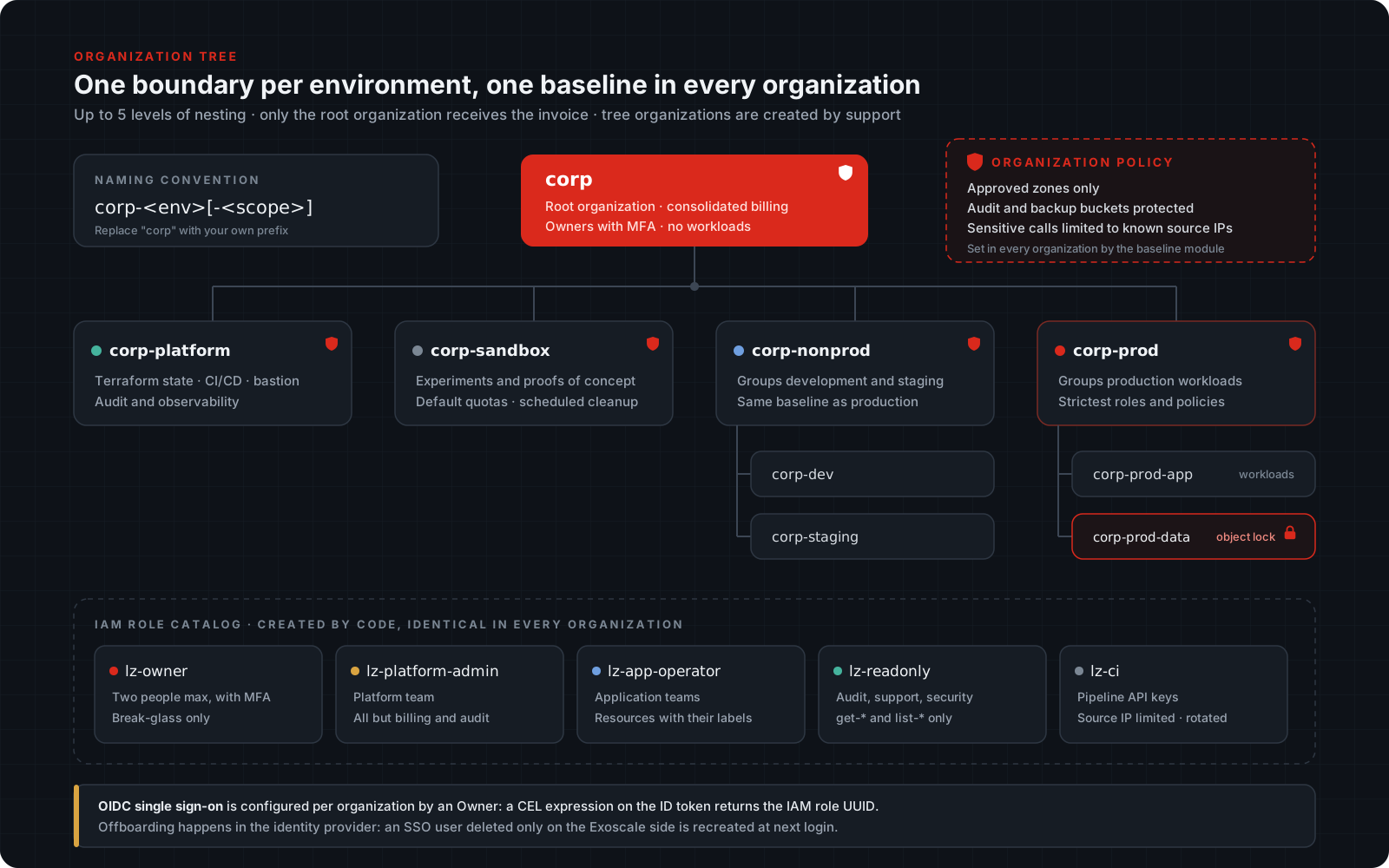
Three simple rules keep your solution healthy:
- The root holds no resources. It holds billing and owners. That is all.
- The Organization boundary is the only watertight isolation. Two environments in the same Organization share the same quotas and access controls. If the question is “can dev break prod?”, the answer must be an Organization boundary, not a label.
- Do not create 40 organizations on day one. Each one has an operating cost: users to invite, roles to replicate, keys to rotate. Start with the first level of the tree, four or five organizations, and add the second level (Dev and Staging, App and Data) as you need them to meet your business needs.
The network: VPC arrives in Q4 2026
Exoscale is bringing the VPC model that teams already know from hyperscalers, starting in Q4 2026 with the core VPC and Security Groups on private networks: a private address space split into subnets, routing between subnets handled by the platform, and Security Groups as the one filtering model, from the internet edge down to traffic between subnets.
For a landing zone, the VPC completes the picture. Segmentation between tiers becomes configuration: Security Groups written in Terraform, reviewed in a merge request, and audited like the rest of the baseline. A network team coming from AWS, Azure, or Google Cloud works with the concepts it already uses.
What it does not change matters just as much. The Organization stays the isolation and billing boundary, since a VPC is a network object, not a governance one. The zone remains the unit of design. And defense in depth still applies: Kubernetes network policies, encryption in transit, and mTLS between services.
Until then: Private Networks
Today, workloads connect through Private Networks: layer 2 segments within one zone, either managed, with DHCP provided by Exoscale, or manual, with static addressing on your side. Security Groups protect what is exposed, and filtering between tiers runs on the hosts (nftables) and in the clusters (network policies on SKS), generated from the same data that will later feed the VPC Security Groups.
Put together, a single organization in a single zone looks like this:
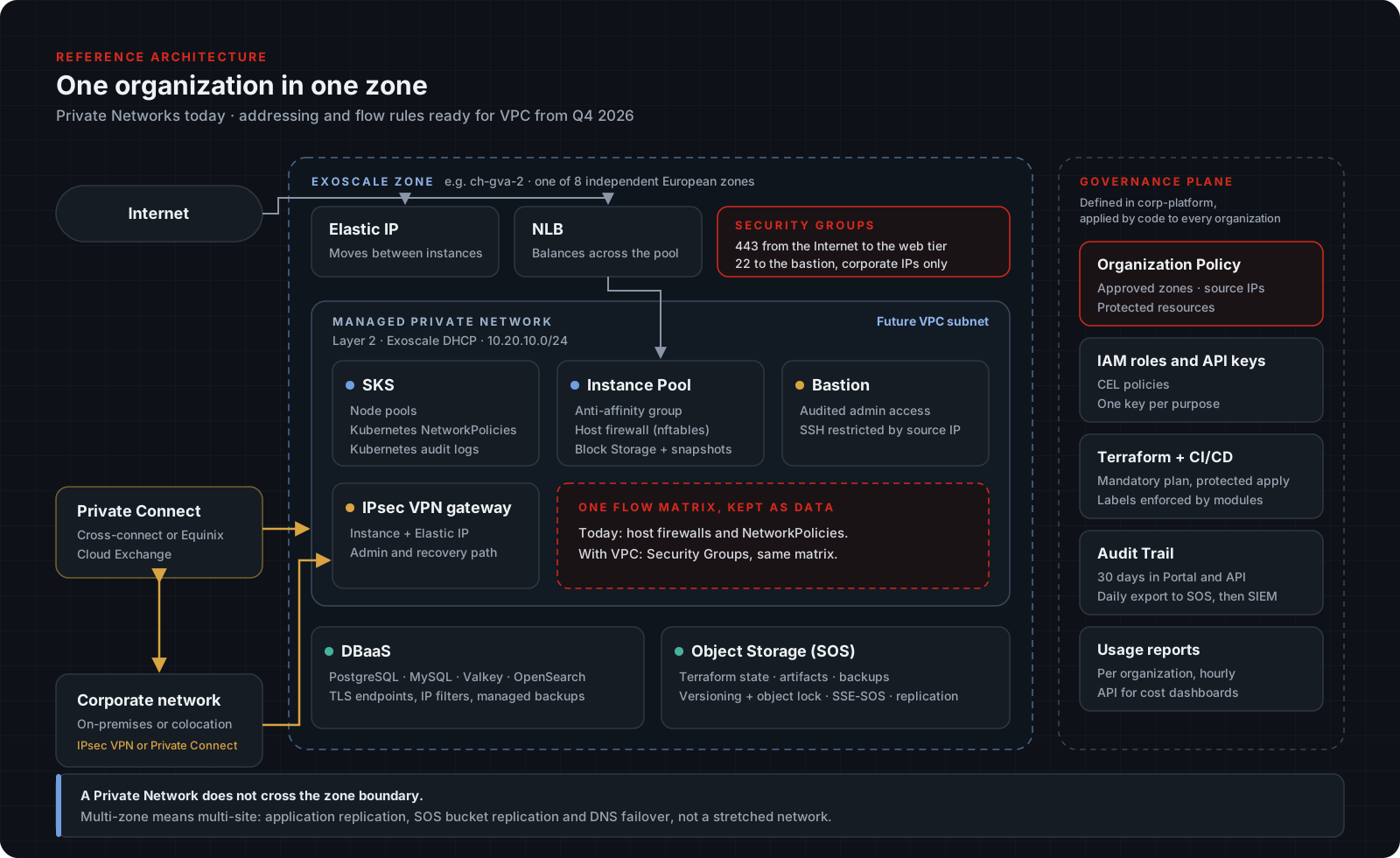
The zone is the unit of design. A multi-zone design is a multi-site design: application replication, VPN or Private Connect between sites, not a stretched network. Choose early between high availability within a zone (anti-affinity groups, instance pools, Network Load Balancer) and resilience across zones (SOS bucket replication, database replication, DNS failover).
All eight zones are in Europe: Geneva and Zurich, Vienna (two zones), Frankfurt and Munich, Sofia, and Zagreb. A failure in one zone has no impact on the others. Document explicitly in the landing zone which data is allowed to land in which zone.
Five decisions that make VPC a configuration change
Whatever you build on Private Networks today should map onto VPC without a redesign. Five low-cost decisions get you there:
- Clean addressing from day one. Treat Private Networks as if they were already subnets: one non-overlapping block per zone and environment, for example a
/16per zone and environment split into/24per tier, documented in the landing zone repository. - Split by tier, not by application. Name networks after stable roles (
web,app,data,mgmt). These become your subnets. One network per application does not translate. - Filtering rules as data. Keep a flow matrix (source, destination, port, reason) in the repository. Today it generates nftables rules and network policies. With VPC, it generates Security Groups. The generator changes, the matrix does not. This is the advice that pays off most.
- No hard-coded IP addresses. Use internal DNS, service discovery, or Terraform outputs. Every IP in an application config file is migration debt.
- The network behind a stable Terraform module. A
network-zonemodule exposes abstract outputs (app_subnet_id,web_sg_id) and hides the implementation. When the VPC arrives, you rewrite the module’s internals and its callers do not move.
When the VPC is available, migrate like any network change: validate in Sandbox, generate Security Groups from the flow matrix in Dev and Staging, then move production service by service. Keep host firewalls running alongside the new rules for a few weeks and log the differences before removing them. A double barrier costs little. A filtering regression in production costs a lot.
Identity: two levels of IAM
The Organization Policy as a guardrail
Exoscale IAM authorizes every request twice: against the Organization Policy, which applies to every user and API key in the Organization, and against the policy of the role in use. Both must allow it. The Organization Policy is the first object to write in a landing zone.
Policies are made of CEL expressions evaluated in order, where the first matching rule wins. For an Organization Policy, the recommended pattern is to deny what must never happen, then end with a catch-all rule:
{
  "default-service-strategy": "allow",
  "services": {
    "compute": {
      "type": "rules",
      "rules": [
        { "action": "deny",  "expression": "!(zone in ['ch-gva-2', 'ch-dk-2'])" },
        { "action": "deny",  "expression": "operation == 'delete-instance' && 'prod' in resources.instance.labels" },
        { "action": "allow", "expression": "true" }
      ]
    },
    "sos": {
      "type": "rules",
      "rules": [
        { "action": "deny",  "expression": "operation in ['delete-bucket', 'delete-object'] && parameters.bucket.startsWith('audit-trail-')" },
        { "action": "allow", "expression": "true" }
      ]
    }
  }
}
Expressions can use bindings such as zone, operation, source_ip, parameters, resources, and identity. Restricting a CI key to its runners’ address range, for example, is one line: source_ip.inIpRange('185.19.28.0/24').
Two behaviors from the documentation deserve attention. If no rule matches, the request is denied, whatever the default strategy. And an invalid expression does not fail loudly: it is skipped, and evaluation moves on to the next rule. Test your policies, do not assume them. Also keep in mind that an Owner can reset the Organization Policy from the Portal: it protects against mistakes, not against the owners themselves, so keep that role to two people with MFA.
A role catalog
Five roles are enough to start. Create them identically in every Organization, from code, never by hand:
| Role | For | Scope |
|---|---|---|
lz-owner | Two people at most, with MFA | Break-glass, not used day to day |
lz-platform-admin | Platform team | Everything except billing and audit resources |
lz-app-operator | Application teams | Operations on resources carrying their team’s labels |
lz-readonly | Audit, support, security | get-* and list-* only |
lz-ci | Pipeline API keys | Minimal scope, source IP restricted, rotated quarterly |
You do not have to write these policies from scratch. The policy examples include complete roles for a development team, a viewer, and backup, database, network, and security administrators, with the operations available for each service. Start from the closest one and narrow it down.
Federation with OIDC
SSO with OIDC is available on every Organization and is enabled by an Owner. You provide the client ID, secret, and issuer URL of your identity provider (Keycloak, Entra ID, Okta, Google Workspace, or any OIDC provider), and users sign in through https://portal.exoscale.com/sso-login/<sso-org-name>.
Authorization is where it gets interesting for a landing zone. At every login, a CEL expression is evaluated against the ID token and must return the UUID of the IAM role to assign. Add a groups claim in the OIDC Additional Claims field, and your identity provider’s groups drive access directly:
'lz-platform-admins' in groups ? '<uuid-of-lz-platform-admin>' :
'team-payments' in groups      ? '<uuid-of-lz-app-operator>' :
'security-audit' in groups     ? '<uuid-of-lz-readonly>' :
false
Any value that is not a valid role UUID denies access, so anyone outside the mapped groups cannot sign in at all. Because the expression runs at every login, moving someone to another group in the identity provider changes their Exoscale role the next time they sign in. The identity provider becomes the single source of truth for human access.
Three points to build into the design:
- SSO is configured per Organization. An SSO user belongs to the Organization it was created in, so each Organization in the tree needs its own configuration and its own mapping, with role UUIDs that differ from one Organization to the next. Generate the expressions from Terraform outputs rather than copying UUIDs by hand.
- MFA lives in the identity provider. SSO users have no Exoscale password, so enforce multi-factor authentication on the provider side. Your two break-glass owners stay standard users, with two-factor authentication, so you keep access if the identity provider is down.
- Offboarding happens in the identity provider. Deleting an SSO user on the Exoscale side is not enough: the user is recreated at their next login. Blocking them in the identity provider is what removes access.
API keys
For machines, the rule is simple: one API key per purpose, never per person, bound to a dedicated role, with a rotation date in the backlog rather than in good intentions. API keys cannot be updated or reassigned to another role once created, so rotation means creating a new key, deploying it, and deleting the old one. Automate that sequence in the pipeline, and restrict CI keys to their runners’ IP range with source_ip in the role policy.
Cross-organization access with assume-role
The organization tree creates one gap: each Organization is an identity island. A FinOps script that reads usage reports across all sub-organizations, or an audit pipeline that collects events from each of them, needs a long-lived key in every Organization. That is N keys to store, rotate, and protect.
Assume-role closes that gap. A role in the target Organization declares which role is allowed to impersonate it. The caller exchanges its own key for a short-lived key that carries the target role’s policy, and nothing else.
How it works, in three pieces:
- The assumer is a role in the organization that needs access, typically the top of the tree. Only one API key is needed for it.
- The assumable role lives in each target organization. Its policy defines what the temporary access can do, its trust rules name the roles allowed to assume it, and a maximum session duration caps how long that access lasts.
- The temporary key is what the assumer receives when it asks. Every call made with it behaves as if the assumed role were calling: that role’s policy applies, and the key expires on its own.
Consent stays with the target organization: nothing can be assumed unless that organization has declared the trust. And no standing key has to live in the sub-organizations anymore.
In a landing zone, this turns the Platform organization into a real control plane:
- FinOps: a reporting job reads usage reports in every sub-organization with one key and one read-only role per organization, instead of one long-lived key per organization.
- Audit: the audit pipeline collects Audit Trail events from each organization into the SIEM through a read-only role, with access that expires after each run.
- Policy enforcement: the platform pipeline checks the Organization Policy and the role catalog in every organization, detects drift, and reapplies the baseline through a narrowly scoped admin role.
- Break-glass: a named admin role, assumable for a short time only, replaces standing admin keys in production organizations.
For a landing zone, three rules apply:
- Provisioning is the critical path. An Organization created by hand has no trust role and stays outside central governance. Create the
lz-trust-*roles in theorg-baselinemodule, like the rest of the role catalog. - Scope the trust, never one god-role. One assumable role per need (
lz-trust-finops-reader,lz-trust-audit-reader,lz-trust-breakglass-admin), each with the narrowest policy and a shortmax-session-ttl. - Watch the trust roles. Changes to
lz-trust-*roles and every break-glass assumption should raise an alert a human reads, not a log line someone might query.
The landing zone as code
The Exoscale Terraform provider covers compute, networking, SKS, DBaaS, DNS, and IAM. One exception: SOS buckets are managed with the AWS provider, since SOS is S3-compatible.
A repository layout that scales:
landing-zone/
├── 00-bootstrap/          # run once: state bucket, CI key, bootstrap role
├── modules/
│   ├── org-baseline/      # IAM roles, org policy, labels, internal DNS
│   ├── network-zone/      # private networks, security groups, NLB, EIP
│   ├── sks-cluster/       # cluster, node pools, policies
│   └── observability/     # audit trail export, log collection
├── envs/
│   ├── platform/
│   ├── dev/
│   ├── staging/
│   └── prod/
└── policies/              # IAM policies as JSON, tested in CI
Store the Terraform state in SOS with the S3 backend. Buckets are encrypted server-side by default, and support versioning and object lock. Enable both on the state bucket: it is your insurance against an unfortunate terraform destroy.
terraform {
  backend "s3" {
    bucket    = "corp-lz-tfstate"
    key       = "prod/network.tfstate"
    region    = "ch-gva-2"
    endpoints = { s3 = "https://sos-ch-gva-2.exo.io" }

    skip_credentials_validation = true
    skip_region_validation      = true
    skip_requesting_account_id  = true
    skip_metadata_api_check     = true
    use_path_style              = true
  }
}
A role and a private network, as code:
resource "exoscale_iam_role" "app_operator" {
  name        = "lz-app-operator"
  description = "Application operations on labeled instances"
  editable    = true
  labels      = { managed_by = "terraform" }

  policy = {
    default_service_strategy = "deny"
    services = {
      compute = {
        type = "rules"
        rules = [
          {
            action     = "allow"
            expression = "operation.startsWith('get-') || operation.startsWith('list-')"
          },
          {
            action     = "allow"
            expression = "'team-payments' in resources.instance.labels"
          },
        ]
      }
    }
  }
}

resource "exoscale_private_network" "app" {
  zone     = "ch-gva-2"
  name     = "prod-app"
  netmask  = "255.255.255.0"
  start_ip = "10.20.10.20"
  end_ip   = "10.20.10.250"
}
The Organization Policy has its own resource, exoscale_iam_org_policy. Its lifecycle is different: creating it updates the existing policy, destroying it only removes it from the state, and the policy also applies to the key Terraform runs with. Test it in the Sandbox organization first.
The bootstrap challenge
Like everywhere, a landing zone starts with a chicken-and-egg problem: you need an API key to create the roles that will issue API keys. The pragmatic answer:
- A human creates one short-lived bootstrap key in the root organization.
- The
00-bootstrapmodule creates the state bucket (versioning and object lock), the IAM roles, and the CI key. - The local state is migrated to SOS.
- The bootstrap key is revoked. This is a runbook step, not an intention.
From then on, every change goes through a merge request, a review, a plan in CI, and a protected apply. There is no other path.
Security baseline
Guardrails in IAM decide who can act. The security baseline decides what a resource looks like when nobody has thought about it yet. Code these defaults into the landing zone modules so that every team inherits them.
- Inbound is closed, outbound is open. A Security Group denies all inbound traffic until you add a rule, but allows all outbound traffic until you define an outbound rule. For production tiers, define egress explicitly: once one outbound rule exists, everything else outbound is blocked. This is a cheap control against data exfiltration and unwanted callbacks.
- Expose load balancers, not instances. Only the Network Load Balancer and edge gateways carry public rules. Application servers and databases stay on private networks, and administration goes through a bastion or VPN with source IP restrictions, never SSH open to the internet.
- Encryption at rest is the default. Block Storage volumes are encrypted with AES-256, and new SOS buckets use server-side encryption (SSE-SOS) by default. For key control, Exoscale KMS manages your own keys with scheduled rotation and replication across zones. Decide in the landing zone which data classes require customer-managed keys.
- Kubernetes is its own perimeter. On SKS, enable Kubernetes audit logs, which are separate from the Exoscale Audit Trail, apply a default-deny network policy per namespace, and issue kubeconfigs with a short
--ttl. Individual kubeconfig certificates cannot be revoked: rotating the cluster CA is what invalidates them, so keep that procedure in the runbook. - Break-glass is tested, not assumed. The owner accounts, their 2FA backup codes, and the procedure to reset the Organization Policy are exercised once a year.
Audit, FinOps, and Compliance
Audit Trail
The Audit Trail keeps 30 days of API activity in the Portal, the API, and the CLI (exo api list-events). That is almost never enough for regulatory requirements. Advanced support plans add a daily export of compressed JSON files to an audit-trail-<UUID> bucket in your account. From day one, plan for an audit bucket in the Platform organization, out of reach of application roles, with versioning and object lock, an ingestion path to your SIEM, and a retention period aligned with your obligations. Then write the detections that matter: changes to the Organization Policy, new API keys, role changes, and Security Group rules opened to 0.0.0.0/0.
FinOps
FinOps on Exoscale starts with the Organization tree. The root receives the consolidated invoice, and each child Organization sees the usage of its own resources. The cleanest cost split is the one carried by the structure, and it costs nothing to maintain.
Labels refine it. Apply a strict convention (env, team, app, cost-center, data-class) to every resource, enforced by the Terraform modules rather than by review comments. Since the same labels are used in CEL authorization rules, a label is a security object as much as a cost one. A wrong label is a wrong permission, so reserve label changes to admin roles.
Then build the feedback loop:
- Visibility: the live usage view is updated every hour and aggregated by product, the usage report API returns the same data for any month, and advanced support plans add per-resource reports after each billing cycle. Pull the API into the same dashboard as your metrics, per Organization.
- Limits: quotas are set per Organization (20 instances by default, raised on request). Keep the Sandbox at its defaults: a quota is both a blast-radius limit and a budget limit.
- Hygiene: schedule the Sandbox cleanup, use lifecycle rules on log and backup buckets so storage does not grow forever, and stop or scale down non-production environments outside working hours.
- Estimation: model each new environment in the pricing calculator before the merge request, and review the monthly report with each team’s owner. Cost surprises come from what nobody looks at.
Compliance
Exoscale holds ISO/IEC 27001, 27017 and 27018 certifications, SOC 2 Type 2 and BSI C5 Type 2 attestations, HDS certification, and a TISAX Level 2 assessment. Certificates and reports are available in the Compliance Center of the Portal. The landing zone is where your share of the shared responsibility model becomes real: a provider certificate says nothing about your firewall rules, your key rotation, or your backup encryption.
Connecting to your own infrastructure
Three options, in order of commitment:
- IPsec VPN on instances: one or two gateway instances with an Elastic IP, in an anti-affinity group. Simple, cheap, and enough for most cases.
- Private Connect: a physical link between your infrastructure and private networks, through a cross-connect in the same data center, or through Equinix Cloud Exchange in Equinix-based zones to reduce interconnection costs.
- Both: Private Connect for production traffic, VPN for recovery and administration.
Private Connect attaches to private networks of a single organization. If your layout multiplies organizations, design the interconnection topology at the same time. It is typically the argument for keeping workloads that need private connectivity in one Platform or Prod organization.
The 4 step roadmap to get started
An Exoscale landing zone takes a short time to design and build, with most of the time spent aligning these choices below with your business’s needs:
- Step 1, scope and structure: organization tree and billing, naming and label conventions, allowed zones and data residency rules, owners with MFA.
- Step 2, identity and bootstrap: Organization Policy written and tested, the five roles in Terraform, SSO in each Organization with group-to-role mapping and offboarding driven by the identity provider, state bucket and CI key, bootstrap key revoked.
- Step 3, network and runtime: the
network-zonemodule with the security baseline (explicit egress, no public instances), VPC-ready addressing, the flow matrix as data with generated east-west rules, a reference SKS cluster and DBaaS template. - Step 4, audit, backup, industrialization: Audit Trail export, SIEM ingestion and first detections, immutable backups with a tested restore, a usage dashboard per Organization, a CI pipeline with mandatory
planand protectedapply, and an onboarding path for new teams.
After that, the product lives: quarterly review of roles, keys, and SSO mappings, a monthly cost review with each team, a yearly break-glass drill, a retrospective with every new team onboarded, and two backlog items: replacing standing cross-organization keys with assume-role, and the move to VPC as it rolls out from Q4 2026.
Five common mistakes
- Copying a hyperscaler design as-is. Organizations, CEL policies, and per-Organization SSO do not map one-to-one to accounts, Service Control Policies, and Identity Center. Translate the intent, not the resources.
- Waiting for the VPC to start. Roadmap dates move, and a platform on hold loses months. Build on Private Networks now with VPC-ready addressing and a flow matrix as data, and the move to VPC is a configuration change.
- One single Organization “to go faster”. This is the most expensive debt to repay. Splitting later means migrating resources, not moving a label.
- Settling for 30 days of audit. The day you need older logs, it is too late to turn on the export.
- Treating the landing zone as a project deliverable. Without an owner and a backlog, it gets bypassed, and the workarounds become the norm.
Conclusion
An Exoscale landing zone rests on three structural decisions: the organization tree for isolation and billing, two-level IAM with the Organization Policy as the ceiling and CEL roles for the details, and a network designed for VPC: built on Private Networks today, with the addressing, tiers, and flow matrix that carry over unchanged when the VPC arrives from Q4 2026.
The rest, from Terraform and CI to audit export, labels, and immutable backups, is execution discipline. That discipline is what separates a platform you build on for five years from an account you have to rebuild in eighteen months.
The good news: on Exoscale, the surface to cover is smaller than on a hyperscaler. Fewer services, fewer primitives, fewer traps. A landing zone takes a few weeks, as long as you do it at the start.