What Is Agent Sandboxing?
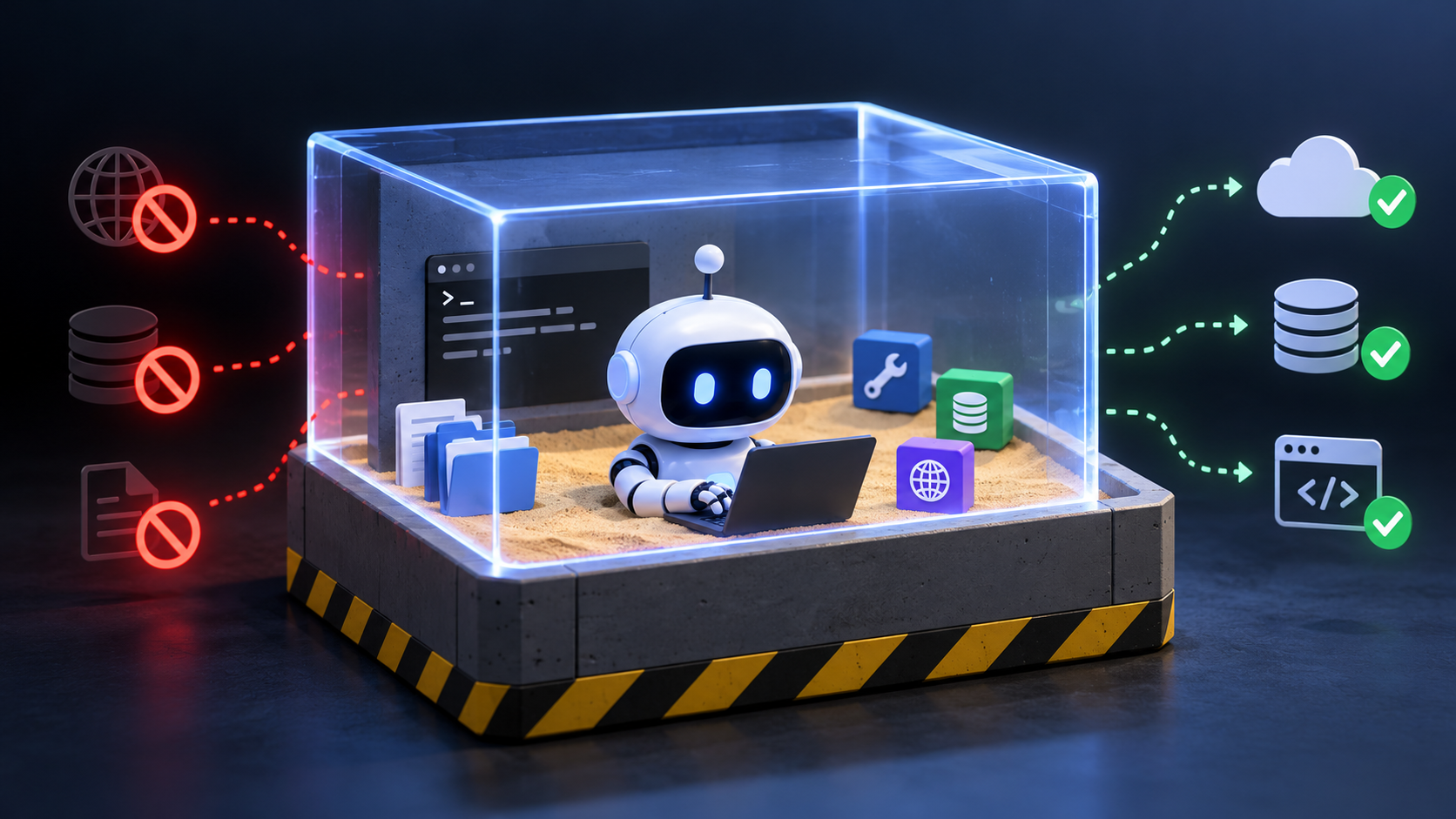
This post covers what agent sandboxing is, why agentic systems need it, and the three practical isolation layers most teams end up combining: process, container/runtime, and network, plus where permissioning fits in. It’s aimed at developers and platform teams who are starting to run AI agents that call real tools against real systems, and who want a clear picture of what an agent sandbox actually contains before they pick an implementation.
We close on the European angle: how sandbox placement and network boundaries turn “keep the data in the EU” from a policy line into infrastructure you can point at.
At Exoscale, we operate a European sovereign cloud, with compute, Kubernetes, and inference across EU and Swiss zones. This is the infrastructure this sandbox model runs on, and the working model we keep coming back to.
Quick summary of this article
- An AI agent sandbox is an isolated execution environment where an agent can run code, call tools, touch files, and hit APIs, but only inside boundaries you’ve drawn.
- Agents dynamically decide what to call. That’s the useful part and the risky part. A wrong tool call, a hallucinated argument, or a prompt injection can turn into a real action against a real system.
- Agent Sandboxing is defense-in-depth. Process limits on what a single execution can do, container or runtime isolation for files and workloads, and network controls for where the agent can talk.
- Permissioning sits on top. Isolation restricts where the agent can go; permissioning restricts what it can do once it gets there.
- Standard containers, gVisor, and Firecracker-style microVMs are three points on the same isolation spectrum, not a ranking. You pick based on threat model, startup budget, and how much of the workload you actually trust.
- For EU teams, sandbox placement and egress policy are where sovereignty stops being abstract. Compute in an EU zone, storage in an EU zone, egress restricted to services you’ve approved, that’s an inspectable control.
What is an AI agent sandbox?
An AI agent sandbox is an isolated execution environment where an agent can take real actions: run code, invoke tools, read and write files, and call APIs. At the same time, it’s restricted by design from accessing the host, production infrastructure, credentials, and external services. The agent still does real work. It just does it within boundaries the platform team intentionally drew.
That’s the part worth being blunt about: a sandbox isn’t a mock. A mock replaces the tools with fakes. A staging environment gives the agent a copy of the world to play in. The sandbox lets the AI agent hit real tools and real endpoints while containing the consequences when it hits the wrong ones.
Most sandboxes share the same characteristics we’d want from any well-behaved untrusted workload: isolation from the host, restricted access to files and services, resource limits, observability, and state that’s either ephemeral or easy to reset.
One thing Agent sandboxing doesn’t do: it doesn’t make the agent behave correctly. A sandbox reduces what happens when the agent gets something wrong. Worth keeping that distinction in mind before we go further.
Why do AI agents need sandboxing?
Conventional software has a fixed control flow. An agent doesn’t. It picks which tool to call, generates the arguments, sometimes generates the code, and reacts to whatever the tool returns. That’s the whole point of an agent, and it’s also why its risk profile differs.
Even a correctly authorized agent can call the wrong tool, hallucinate an argument, or take instructions from a document it was only supposed to read. Representative failures include overwriting or deleting files, reading credentials or secrets from the filesystem, calling an external API it shouldn’t, scanning internal services, or stepping across a tenant boundary in a shared environment.
The mitigation follows the same principle we already apply across the platform: least privilege. Give the agent the narrowest set of tools, files, and network destinations it needs. Then contain the blast radius so one incorrect action stays local instead of becoming a production incident.
Two data points are worth naming here. OWASP’s Top 10 for LLM Applications lists “Excessive Agency” as a core risk and recommends limiting permissions and autonomy to the minimum necessary, with human approval for consequential actions (OWASP LLM Top 10). A 2025 security benchmark found 94.4% of tested AI agents could be hijacked via prompt injection. Not through a conventional exploit, but through content the agent was asked to process (Straiker, 2026). Once an agent has real permissions, it stops being a chatbot problem and becomes an infrastructure problem.
How does agent sandboxing work? Three practical isolation layers
There’s no single “AI Agent sandbox” primitive. In practice, you compose three layers, each containing a different class of failure. None is sufficient on its own.
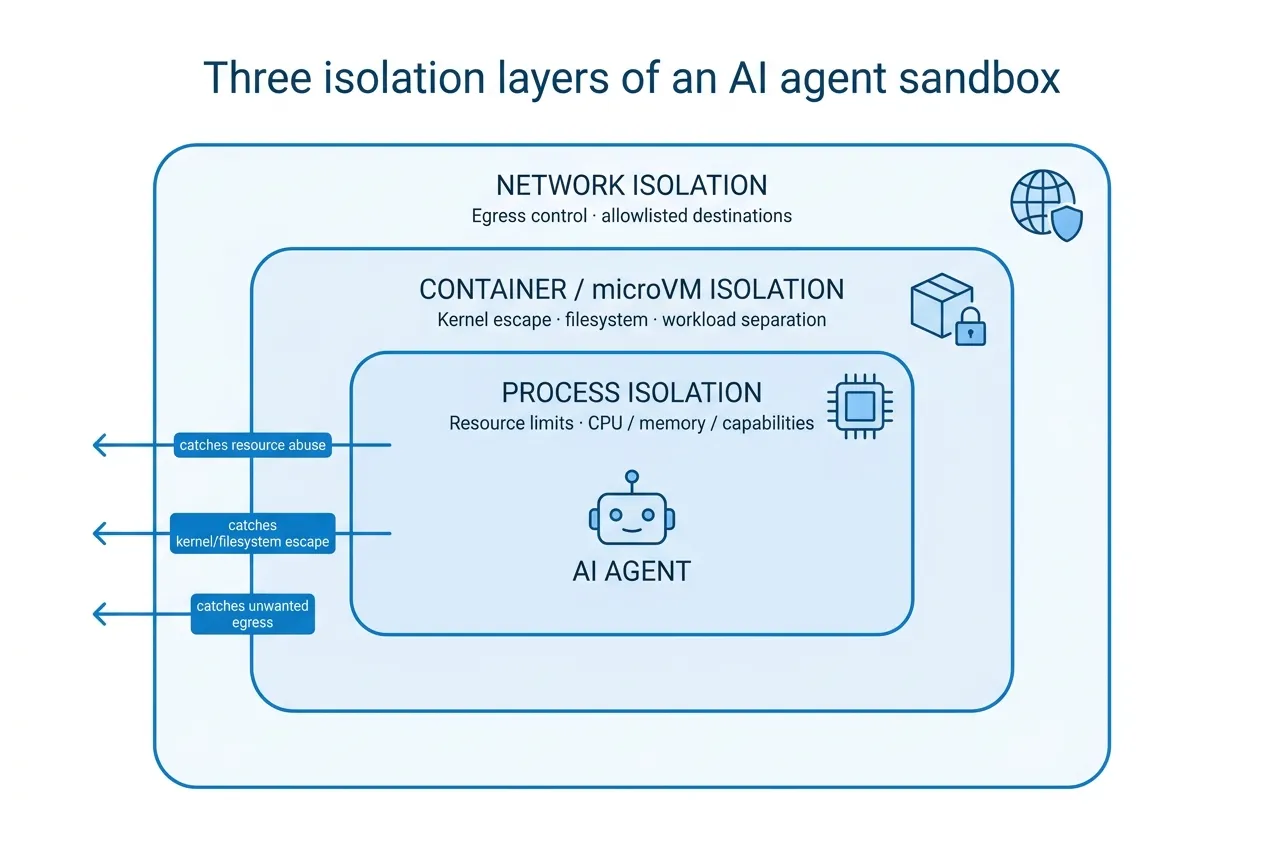
Process isolation: limiting what a single execution can do
Process isolation is the innermost layer. Run agent code as an unprivileged user, drop capabilities you don’t need, and cap CPU, memory, disk, execution time, and process count so a runaway loop or fork bomb can’t take the box down.
The point isn’t just to defend against malicious commands. It’s also defense against a generated command that was never supposed to exist. If the agent writes and executes a shell line, it should run with the least authority we can give it.
The limitation is straightforward: process isolation constrains a single execution. It doesn’t protect files, credentials, or services the process legitimately has access to. If the agent has a token in its environment, tight ulimits won’t save you.
Container and runtime isolation: containing files, state, and workloads
The next layer of an agent sandbox separates the agent’s environment from the host and other workloads. Private root filesystems, per-session containers, and disposable workspaces mean a destructive command hits an ephemeral surface instead of your host or your neighbor’s data.
In multi-tenant setups, this matters even more. Two sessions from different tenants should not share unrestricted execution state. Not because we assume malice, but because the agent might reuse whatever’s convenient.
Standard containers share the host kernel, which is fine for a lot of workloads and much less fine for arbitrary agent-generated code. Stronger options exist:
- gVisor, from Google, intercepts application syscalls and reimplements much of the Linux kernel interface in user space, so container code never talks to the host kernel directly. It’s used in production behind GKE Sandbox.
- VM-based runtimes like Firecracker and Kata Containers give each workload its own guest kernel; AWS’s Firecracker boots a microVM in around 125ms with under 5 MiB of memory overhead per VM, which is why it powers Lambda and Fargate.
These are options on a spectrum, not a single recommended path.
Even container isolation has failure modes worth knowing. CVE-2022-23648 in containerd’s CRI plugin let a maliciously crafted container image declare a volume that read arbitrary files from the host filesystem, which is a real bug in real infrastructure, not a hypothetical (NVD entry). Containers help, but they don’t remove the problem.
One more limitation: an agent can still trash its own sandbox unless you’ve set up snapshots, rollback, or a “throw it away after each session” model.
Network isolation: controlling where the agent can communicate
Isolating compute without isolating the network is a common mistake. If the agent’s sandbox can reach anything on the internet or anything on your internal network, most of the point is lost.
Deny-by-default egress, allowlisted destinations, DNS restrictions, and segmentation between the sandbox and the rest of your VPC are the practical controls. They shut down the interesting failure modes: calling an unintended external API, exfiltrating data to an attacker-controlled endpoint, scanning internal services, or hopping laterally toward a database that was never meant to be reachable.
The rule of thumb: allow only the endpoints the agent actually needs, and log everything else. Network policy can’t stop the agent from doing damage entirely inside the sandbox, but it decides whether that damage stays inside.
Comparing agent sandboxing layers and their limitations
| Failure mode | Main control | What the control contains | What can still happen |
|---|---|---|---|
| Agent deletes or overwrites a file | Container/runtime isolation | Damage stays inside the sandbox filesystem | Files inside the sandbox are still lost until state is reset |
| Agent calls the wider internet | Network isolation | Blocks unapproved outbound destinations | Approved endpoints can still be misused |
| One tenant reads another’s data | Container/runtime + network isolation | Filesystem, kernel surface, and network paths kept separate | Shared upstream services (a common vector DB, a common inference endpoint) remain a shared surface |
| Agent consumes excessive resources | Process isolation | CPU, memory, disk, and time caps stop runaway execution | The agent’s own task fails; other work on the node is unaffected |
Where does permissioning fit into an agent sandbox?
Isolation and permissioning solve different problems. Isolation controls where the agent can reach. Permissioning controls what it can do once it gets there. You need both.
Apply least privilege to every axis the agent touches: tools, files, APIs, credentials, data. Separate read from write where it makes sense. Prefer short-lived credentials over long-lived ones, tool-specific scopes over broad ones, and explicit capability grants over implicit inheritance. For anything with real-world consequences, like sending money, deleting production data, or publishing something external, put a human approval gate in front of it.
The honest limitation: a sandboxed AI agent with too much authority inside its sandbox can still misuse a legitimate tool. Permissioning is where you decide how much rope the tool itself gets, and that decision doesn’t go away because you added isolation.
Containers, gVisor, or microVMs: how strong should an agent sandbox be?
The three layers tell you what needs to be controlled. Containers, gVisor, and microVMs are three ways to decide how strongly to draw that boundary. There isn’t a single right answer; there’s a trade-off worth being explicit about.
- Standard containers start fast, are familiar to operate, and share the host kernel. Fine for trusted internal workloads. Less appropriate as the outer boundary for arbitrary agent-generated code.
- gVisor sits in the middle: intercepts syscalls, reduces host-kernel exposure, keeps container-like density, and pays a compatibility and performance cost.
- Firecracker- and Kata-style microVMs give each workload its own guest kernel and hardware-backed isolation, making them a common choice for untrusted code execution and multi-tenant AI code sandboxes. They’re heavier to operate.
The right pick depends on threat model, startup budget, workload compatibility, and how much operational complexity your team wants to own. Treat these as three points on a spectrum, not a ranking.
What else does a production-ready AI agent sandbox need?
Isolation and permissions are the load-bearing pieces. A few more controls decide whether the sandbox is usable in production:
- Resource controls: CPU, memory, disk, network, execution time, and tool-call limits all of them, not just the easy ones to set.
- Observability: log tool calls, API requests, execution attempts, access denials, state changes, and policy violations. If you can’t see what the agent tried to do, you can’t tell whether the Agent sandbox helped.
- Ephemeral or resettable state: disposable environments per session, snapshots, and a clean rollback path. Agents will corrupt their own workspace. Plan for it.
- Auditability: keep records that a security or platform team can actually read later. What was attempted, what was blocked, and by which policy.
Together with the process, runtime, network, and permission boundaries, these are the defense-in-depth layers. No single one carries the weight.
Agent sandboxing and data sovereignty in Europe
Once the technical model is in place, the European angle stops being abstract. Execution isolation decides what an agent can affect. Network policy decides where its data and requests can flow. Both become concrete when the underlying compute, storage, and network sit in a specific jurisdiction.
Keeping execution and storage in an EU zone, and restricting outbound traffic to services you’ve explicitly approved, gives security and compliance teams something inspectable: a set of technical boundaries, not a policy statement. That’s the shape of “demonstrable control” that regulators, customers, and internal reviewers keep asking for.
Worth being precise: EU deployment plus network restrictions are technical sovereignty controls. They don’t by themselves establish GDPR compliance, and they don’t remove every cross-border data transfer consideration. They’re part of the answer, not the whole one. Context for why teams are building these controls now: the EU AI Act (Regulation 2024/1689) entered into force in August 2024, with prohibited-practice rules applying from February 2025 and GPAI model obligations from August 2025. The original August 2026 deadline for high-risk system rules was subsequently deferred to December 2027 under the Digital Omnibus on AI (Regulation (EU) 2026/1744, consolidated text at EU AI Act official text), but GDPR enforcement remains active and substantial throughout.
At Exoscale, this is where the platform maps onto the model. SKS (Scalable Kubernetes Service) gives you the node pools and load balancers to place workloads you want isolated. Concrete AI, our Dedicated and On-Demand Inference product suite, built on GPU Servers, covers sovereign LLM and agent inference inside EU zones. Object Storage and Block Storage keep data resident. Referencing them matter-of-factly because they’re the pieces you’d end up wiring together anyway.
When should companies use agent sandboxing?
The short version: whenever an agent has enough authority that a wrong tool call matters.
Concretely, that includes agents that execute generated or untrusted code; agents with filesystem, database, shell, browser, API, or MCP tool access; multi-tenant agent platforms where workloads and data have to stay separated; dev and evaluation workflows that need to reproduce failures without touching production; and any production use case where a mistaken tool call could modify data, expose credentials, trigger an external action, or create a compliance issue.
If none of those apply, you probably don’t have an agent yet, but a chatbot with a fancy prompt. If any of them do, sandboxing is the layer you don’t want to be adding after the incident.
Agent sandboxing is about controlling the blast radius
Sandboxing an Agent doesn’t make a model predictable. It assumes the model will do something you didn’t expect and limits what happens when it does. That reframe matters, because it changes what you’re actually building.
The layered model, in one line each: process controls constrain what a single execution can do; runtime isolation separates workloads and state; network controls decide what’s reachable in the first place. Permissioning, resource limits, observability, and resettable state sit alongside them as the rest of the defense-in-depth stack.
For European teams, Agent sandbox placement and network boundaries are where a security principle turns into infrastructure that engineering, security, and compliance can all inspect. That’s the part worth building deliberately. In a follow-up post, we’ll take this from concept to configuration by running a sandboxed agent workload on SKS with egress policy, per-session isolation, and inference kept inside an EU zone.

